How to Track Your Ski Runs: The Complete Guide
Why Track Your Ski Runs?
Every skier remembers their best run — the one where everything clicked, the snow was perfect, and you felt like you could carve forever. But without tracking, those memories stay vague. How fast were you actually going? How much vertical did you cover that day? Was that powder run at Coronet Peak really longer than the groomer at Cardrona?
Tracking your ski runs turns gut feelings into real data. Over time, that data becomes genuinely useful. You can see whether you are improving season to season, compare your performance across different resorts, and set concrete goals instead of vague ones. “I want to ski faster” becomes “I want to beat my average speed on blue runs by 5 km/h.”
Beyond performance, tracking builds a ski journal — a record of everywhere you have been, every run you have taken, and every day you spent on snow. Years from now, you can pull up a specific trip and relive it in detail: which runs you skied, your stats for each one, how the day unfolded from first chair to last. For dedicated skiers, this kind of personal history is genuinely valuable.
Tracking also makes sharing more meaningful. Instead of telling friends “I had a great day,” you can show them the actual numbers: 14 runs, 8,400 meters of vertical, a top speed of 72 km/h. It gives your ski stories a backbone of real data.
What Gets Tracked
Modern GPS ski tracking captures a comprehensive set of metrics for every run. Here is what a good tracker records:
- Speed — current speed while skiing, maximum speed reached on each run, and average speed across the descent. Speed is measured in real time using GPS position updates.
- Distance — total horizontal distance covered on each run and across the full day. This measures the actual path you skied, including turns and traverses, not just the straight-line distance from top to bottom.
- Altitude profile — a continuous elevation trace showing your descent from top to bottom. This reveals the pitch changes on each run and lets you compare the steepness of different terrain.
- Vertical drop — the total elevation change from the start of a run to the finish. Over a full day, cumulative vertical is one of the most meaningful stats — it tells you exactly how much skiing you actually did, regardless of how many lifts you rode.
- Duration — how long each run took from start to finish, and total skiing time for the day (excluding lift rides and breaks).
- Run count — the total number of individual runs completed. The tracker automatically detects when you stop descending and start riding a lift, separating each run without manual input.
- Season totals — cumulative stats across the entire season, including total distance, total vertical, days on snow, and number of resorts visited.
All of this data is captured passively once you start a recording session. There is no need to manually mark the start and end of each run — the tracker handles that automatically based on your GPS movement patterns.
Run Replay: Relive Your Best Moments
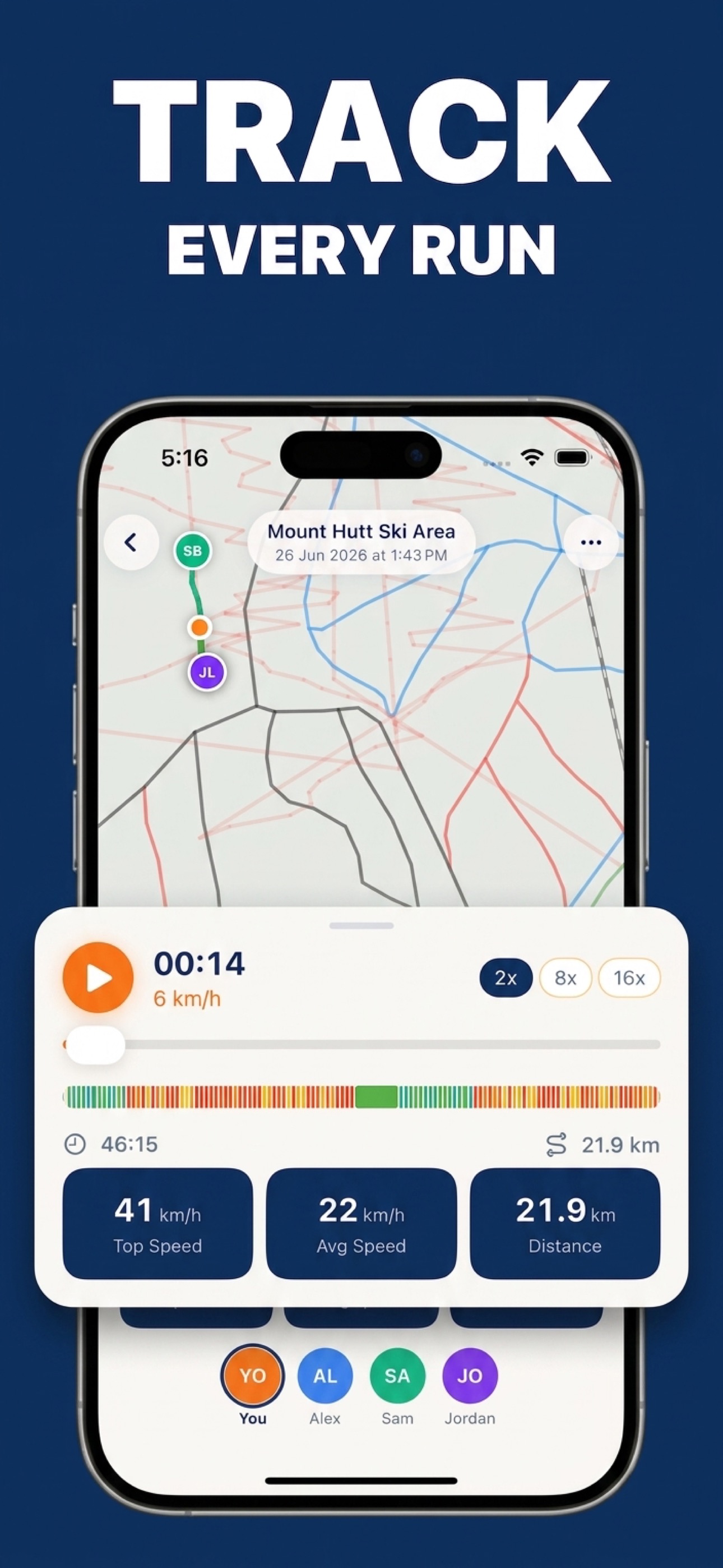
Raw numbers tell part of the story, but replay brings it to life. Run replay takes your recorded GPS trace and animates it on the resort map, showing your exact path down the mountain as it happened. You can watch yourself carve through turns, see where you picked up speed, and spot the sections where you slowed down.
Replay works at multiple speeds. Watch at 2x for a detailed review where you can study your line through each section. Jump to 8x for a quick overview of the full run. Or use 16x to zip through in seconds and get the big picture. You can switch speeds on the fly to slow down on interesting sections and fast-forward through flat traverses.
During replay, your stats update in real time alongside the animation. You see your speed at each point in the run, the cumulative distance covered, and your current elevation. This makes it easy to correlate what you see on the map with the numbers — that fast section where the trace straightens out corresponds to the speed spike in the stats.
Replay is especially useful for comparing different runs on the same trail. Did you take a better line on your third lap? Were you faster in the morning when the snow was firm? Pull up both replays and see the difference for yourself. It turns every ski day into a learning opportunity.
Season Journal
Individual run tracking feeds into a bigger picture: your season journal. This is a complete record of your skiing across the entire season, organized by day and grouped into trips.
The journal opens with season-level stats at the top: total distance covered across all days, total vertical drop accumulated, and number of days skied. These numbers grow throughout the season and give you a clear sense of how active you have been. The season is automatically detected based on your hemisphere — June through October for the Southern Hemisphere, November through April for the Northern.
Below the season summary, your runs are organized day by day. Each day shows the resort you visited, the number of runs completed, and key stats for the day. Individual runs are listed with their own metrics, so you can drill into any specific descent. Days are labeled with relative dates — “Today,” “Yesterday,” or the actual date for earlier entries — making it easy to find recent sessions.
The journal also groups days into trips. If you skied three consecutive days at the same resort, those days are automatically collected into a single trip card. This is especially useful for destination ski holidays — your week in Queenstown becomes a single trip entry with aggregate stats, rather than seven scattered day entries. Trip cards use resort-colored gradients and display in a masonry grid layout that makes browsing your season feel more like a visual scrapbook than a spreadsheet.
How SnowRun Helps
SnowRun provides free GPS ski tracking with no subscription required for the core recording features. Starting a session takes a single tap from the map screen — no configuration, no calibration, no fiddling with settings at the top of a cold, windy lift.
Once recording starts, SnowRun handles everything automatically. It detects individual runs, separates lift rides, and compiles your stats in real time. You can glance at your phone between runs to check your speed and vertical, or just leave it in your pocket and review everything at the end of the day.
Key tracking features include:
- One-tap recording — start and stop with a single button press
- Automatic run detection — no need to manually mark each run
- Real-time stats — speed, distance, vertical, and run count updated live
- Multi-speed replay — relive any run at 2x, 8x, or 16x with animated GPS trace
- Season journal — day-by-day breakdown with auto-grouped trips
- Apple Health sync — ski sessions appear as workouts in the Health app with calories and heart rate data
All tracking data is stored on your device and synced to your account, so you never lose your history. Whether you are a beginner counting your first ten runs or a seasoned skier logging your hundredth day of the season, every run goes into the same journal, building a complete picture of your skiing life.
Start tracking every run for free
Record speed, distance, and vertical on every ski day with zero setup.
Download SnowRun FreeFrequently Asked Questions
Is GPS tracking accurate at ski resorts?
GPS speed measurements are typically accurate to within 2–3 km/h in open terrain. Accuracy can decrease in dense tree cover or narrow valleys where satellite visibility is reduced. Open bowls and wide groomed runs give the best results.
How do I replay my ski runs?
After recording a session, open any run from your journal. The replay screen shows your GPS trace on the resort map with a play button. Choose 2x, 8x, or 16x speed and watch your animated path with live stats updating alongside.
Can I track without cell service?
Yes. GPS tracking uses satellite signals, not cell towers. Your phone receives GPS data regardless of whether you have cell coverage. The resort map is cached for offline use, so tracking works perfectly in areas with no signal.